This page was machine-translated from Portuguese and may contain mistakes. Read the original
It’s also very common to hear people ask: Can you use the Page Object Model (POM) with Playwright?
This question usually comes up because of the comparison with Cypress, where the official documentation doesn’t recommend using Page Objects. For Cypress, I recommend watching Walmyr’s Page Objects playlist, where he discusses this topic in depth.
And for Playwright, the answer is: It depends (my favorite answer!). You can use Page Objects in Playwright, just as you can in any other framework (including Cypress!!).
No framework, in fact, prevents the use of POMs. You need to know and understand the best practices of each one so you can make the best use of the features it offers. What’s not recommended is using a new framework exactly like one you’ve used in the past without considering its best practices. That’s because each framework has its own unique way of working. They may share some similarities, but no one builds a framework to be exactly like another.
In summary, Playwright does not take a stance for or against the use of POMs, so you should evaluate whether it makes sense for your project.
Origins of the Page Object Model (or POM)
It’s hard to say for sure when it first emerged, but one of the earliest records dates back to around 2006 by Simon Steward—who is the creator of WebDriver and the technical lead at Selenium (according to https://bard.google.com/, John Ferguson Smart, and Simon’s own website).
Well, it’s 2023 now, and this concept emerged around 2006 (that’s 17 years ago!!!). So I invite you to think about this with me: How did we develop software back then?
It doesn’t seem like that long ago, but the first iPhone was released in 2007, the first version of ReactJS was released in 2013, the first version of Cypress was in 2017, and Playwright’s was in 2020—and so on. So, developing software in 2006 was certainly very different from how it is today—and, consequently, so was testing software.
Although it’s an extremely important concept in the field of test architecture, it’s important for us to make the necessary adaptations and updates to keep pace with technological advancements.
What Is the Page Object Model (or POM)?
In its initial proposal from 2006, the idea was to offer a way to write tests that was closer to object-oriented programming to facilitate code maintenance.
Without POM, locators (which are the elements of a page) and their methods would be scattered throughout the test code, making it very time-consuming to update or identify bugs. With POM, each class would have its locators mapped out, along with their respective methods, and the test files would be cleaner and less tightly coupled. For each page in an application, a file would be needed containing all the fields/locators on that page and the methods for interacting with those locators (typing, clicking, etc.). There are a few other file formats that are also considered POMs; I discussed them in the “Community Contributions” section below.
In simple terms, these would be the benefits of POM (even back then):
- ease of maintenance: since the locators and methods would all be in a single file (called a “pom file” or “POM file”), and the test in a separate file.
- reduction in code duplication: since if a test needed to use a locator, instead of rewriting it, one would only need to import the class to which the locator is mapped (in the pom file).
- Ease of reading code: with this separation, it’s easier to know where to look to understand where a locator is mapped and to understand the methods related to it.
Nowadays, in 2023, the way we interact with page elements in frameworks (such as Playwright, Cypress, and Selenium itself) has evolved significantly. And, of course, the way applications are developed dictates how automation will work.
There are applications where a large part of the workflow takes place on a single page. For example, on the website www.gap.com. After an item is added to the cart and the user signs in, on the checkout page we can see that everything is loaded on a single page (shipping address, shipping method, payment method); only what is displayed changes, and there are numerous workflows. In this case, if we were to follow the 2006 concept, all fields/locators and their methods would be mapped to a single file, causing the file to become very large and defeating the original purpose.
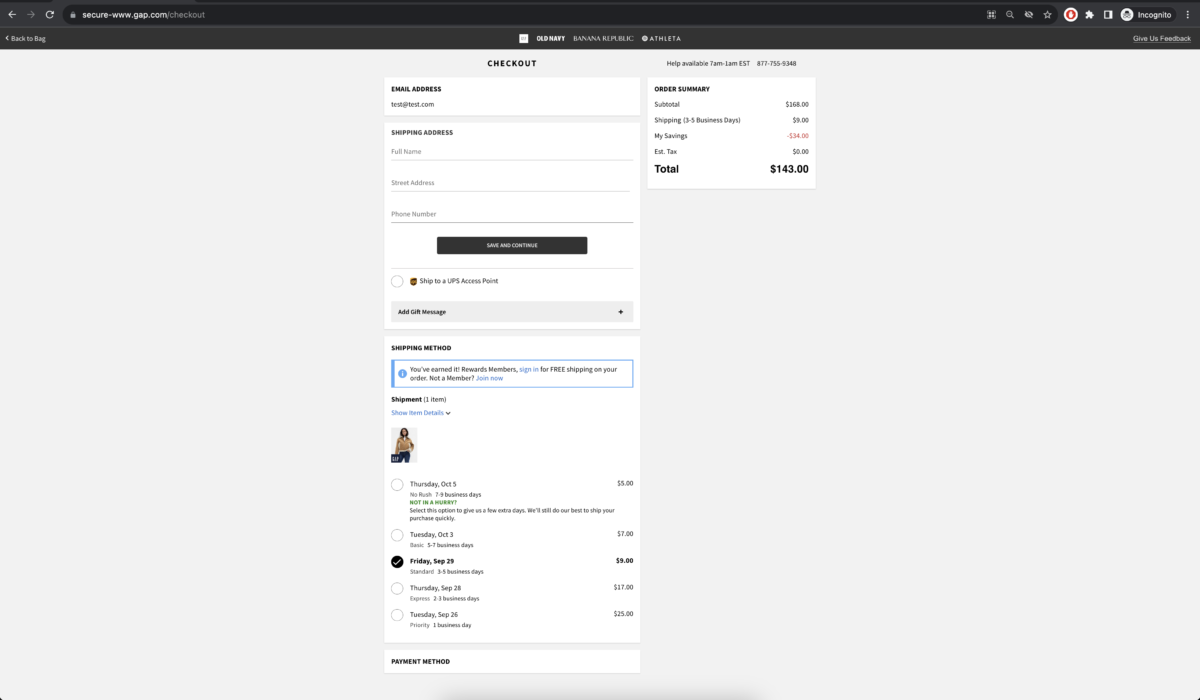
Nowadays, then, to continue reaping the benefits of the POM concept, we have to abstract the original idea. In this example, it’s as if there were multiple pages within a single one. We can see:
- header (with the “Back to Bag” link, links to other sites, and the “Give Us Feedback” link)
- the “EMAIL ADDRESS” container/block
- the “SHIPPING ADDRESS” container/block
- the “PAYMENT METHOD” container/block
- the “ORDER SUMMARY” container/block
In this case, we can, for example, consider each of these blocks as a POM file. Furthermore, if one of the blocks is too complex, we can also subdivide it. It all “depends” on what needs to be tested. The idea is to ensure maintainability, reduce duplication, and ensure readability.
In summary, the Page Object Model (POM) is a representation of a page (according to the 2006 concept) or a block/component/context (in a more modern concept) with its locators and interaction methods. This is a subjective concept, so it’s important to align with the team on how the concept will be applied within your project. Perhaps a more interesting name for the modern approach would be “Component Object Model” or “Context Object Model”… let’s take a poll, lol.
How to Use the Page Object Model (or POM) with Playwright
This is a broad topic. As I mentioned in the previous section, the concept of the Page Object Model depends on the context. Here, we’ll look at examples of how to use it in the more modern sense.
Example 1:
- Website: https://www.saucedemo.com/
-
Context: This code was implemented for a coding battle, so there is no “real” scenario involving a team, requirements, etc. Therefore, I followed the principles I believe are best for a generic context—the project and the people involved should always be considered when making a formal decision. The tests were implemented both with
and without
the Page Object Model, as an exercise, to evaluate both options. The challenges of the coding battle were:
- Test the happy path of the login functionality (Login credentials—username and password—must be protected, since, in “real life,” such data is sensitive and varies from environment to environment)
- Test the happy path of the checkout functionality (To make the test more “real-life,” the user must add and remove items from the cart before completing the checkout process)
- Test the product sorting functionality (Feel free to test one or more sorting options (e.g., Name A-Z, Name Z-A, Price Low-High, Price High-Low))
- Test the footer links (social media) (Verify that the correct links open in a new tab)
- Configure the tests to run in a continuous integration pipeline on at least 3 different browsers.
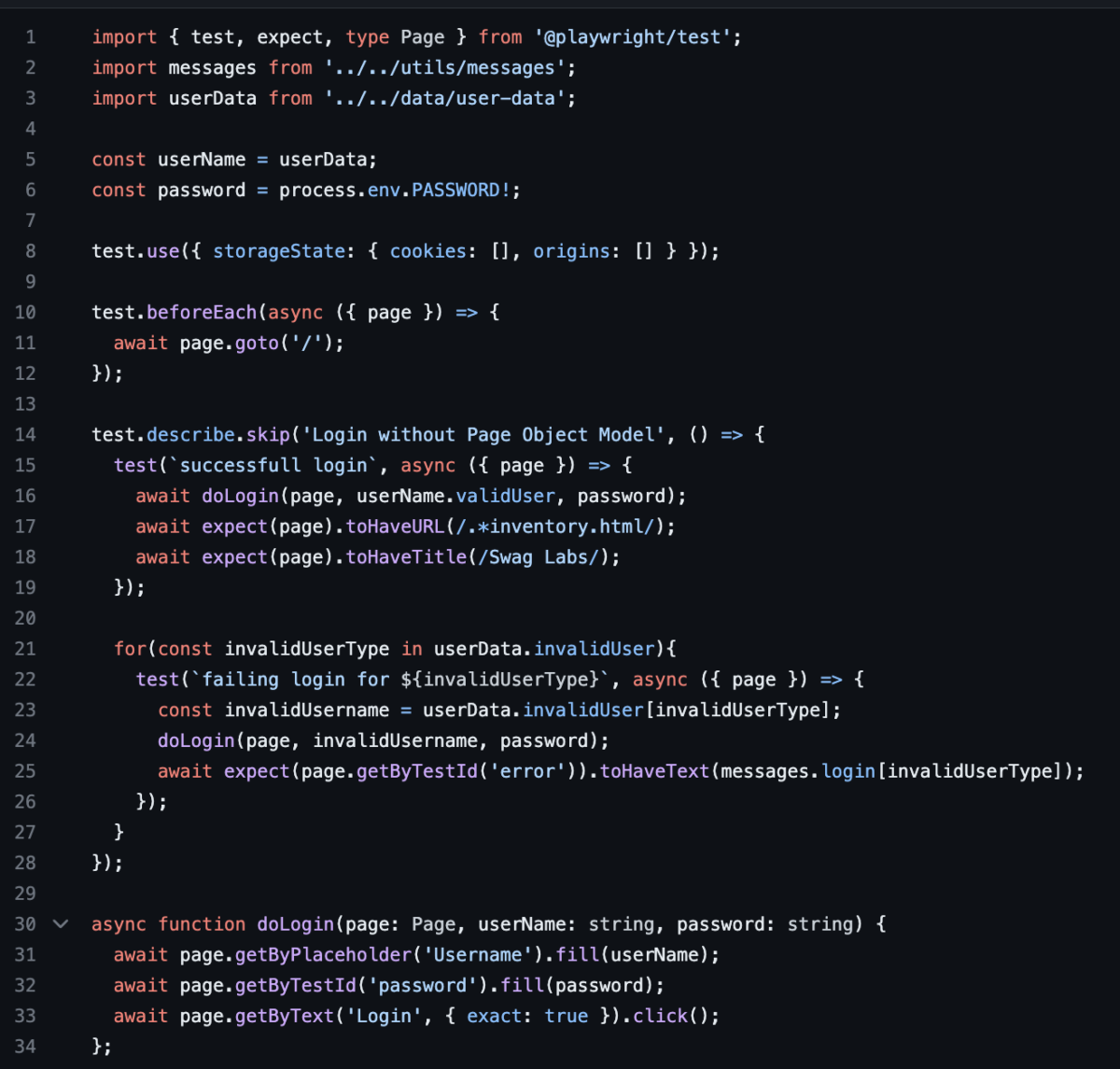
- Login Test (Challenge 1) without POM:
The locators (getByTestId, locator, getByRole, etc.) were not chosen for performance reasons, but rather to demonstrate the variety of possibilities. I recommend watching the webinar “Locator Strategies with Playwright” for more details on locators.
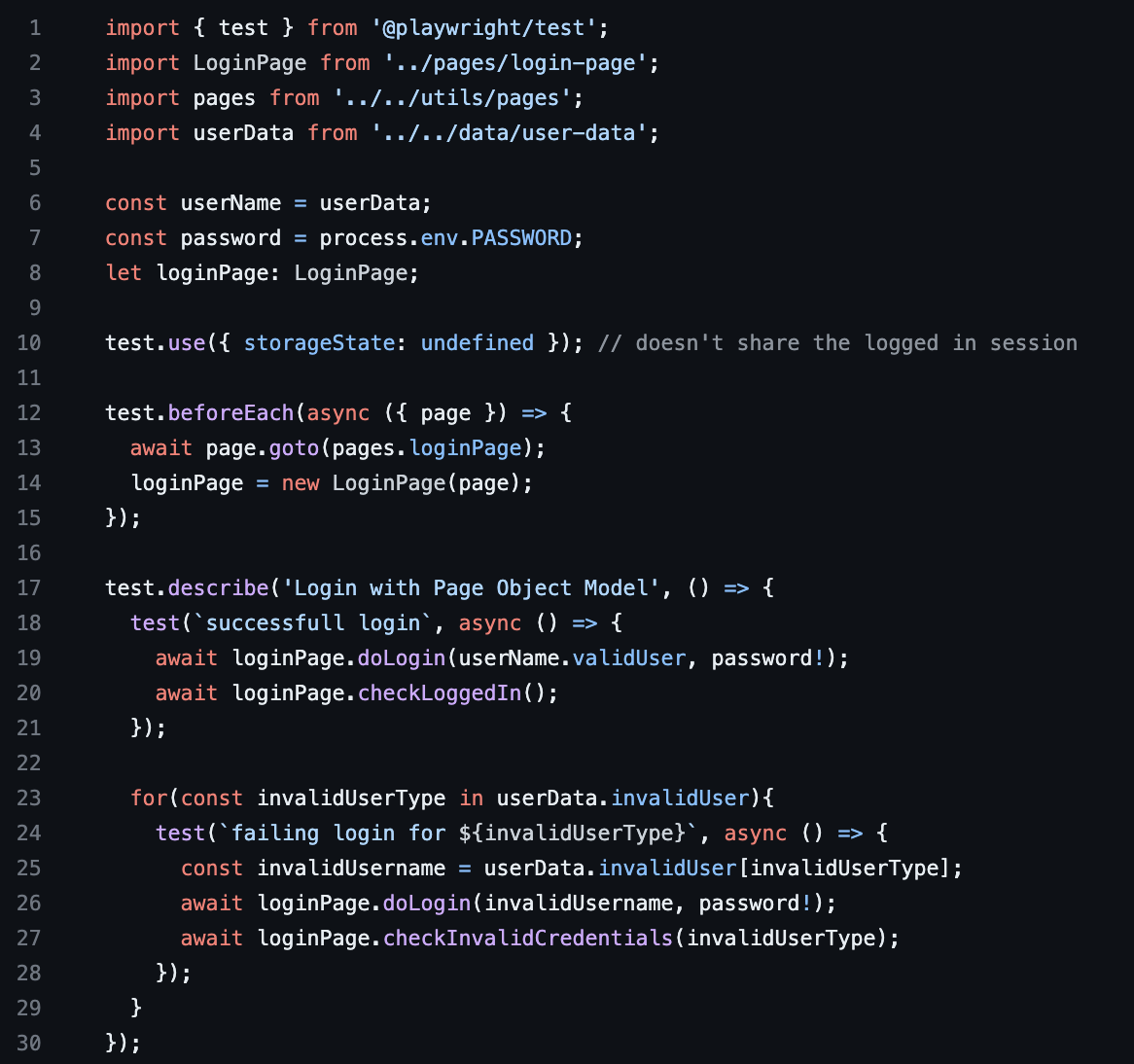
- Login Test (Challenge 1) with POM:
One POM file was required for this test: LoginPage
- Login Test Considerations:
For the scenario without the POM, the test isn’t that complex to understand since it’s a very straightforward feature with basically just 3 fields. I ended up creating a `doLogin` method to avoid duplicate code; I don’t recommend using methods in the spec file—I prefer to keep it as clean as possible. If we need to perform a login in some other file, this method would technically be out of place. Playwright offers a feature that automatically stores and loads login credentials in tests, so the Page Object would provide an additional benefit in this case, since essentially the same steps would be used in the setup file, allowing for code reuse in both places (setup and spec). As simple as this scenario may be, I recommend using POM.
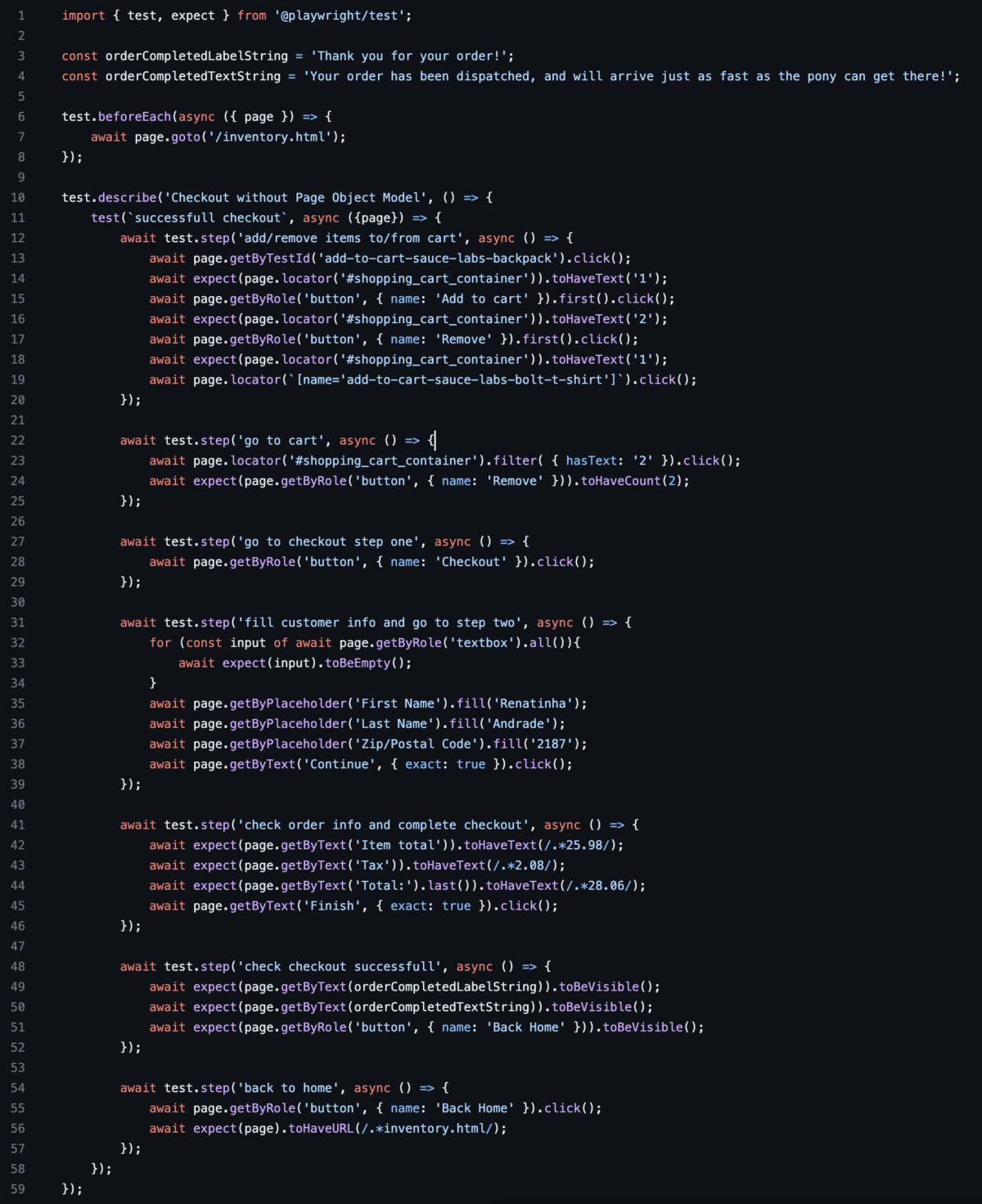
- Checkout Test (Challenge 2) without POM:
The locators (getByTestId, locator, getByRole, etc.) were not chosen with performance in mind, but rather to demonstrate the variety of possibilities. I recommend watching the webinar “Locator Strategies with Playwright” for more details on locators.
- Checkout Test (Challenge 2) with POM:
Six POM files were required for this test:
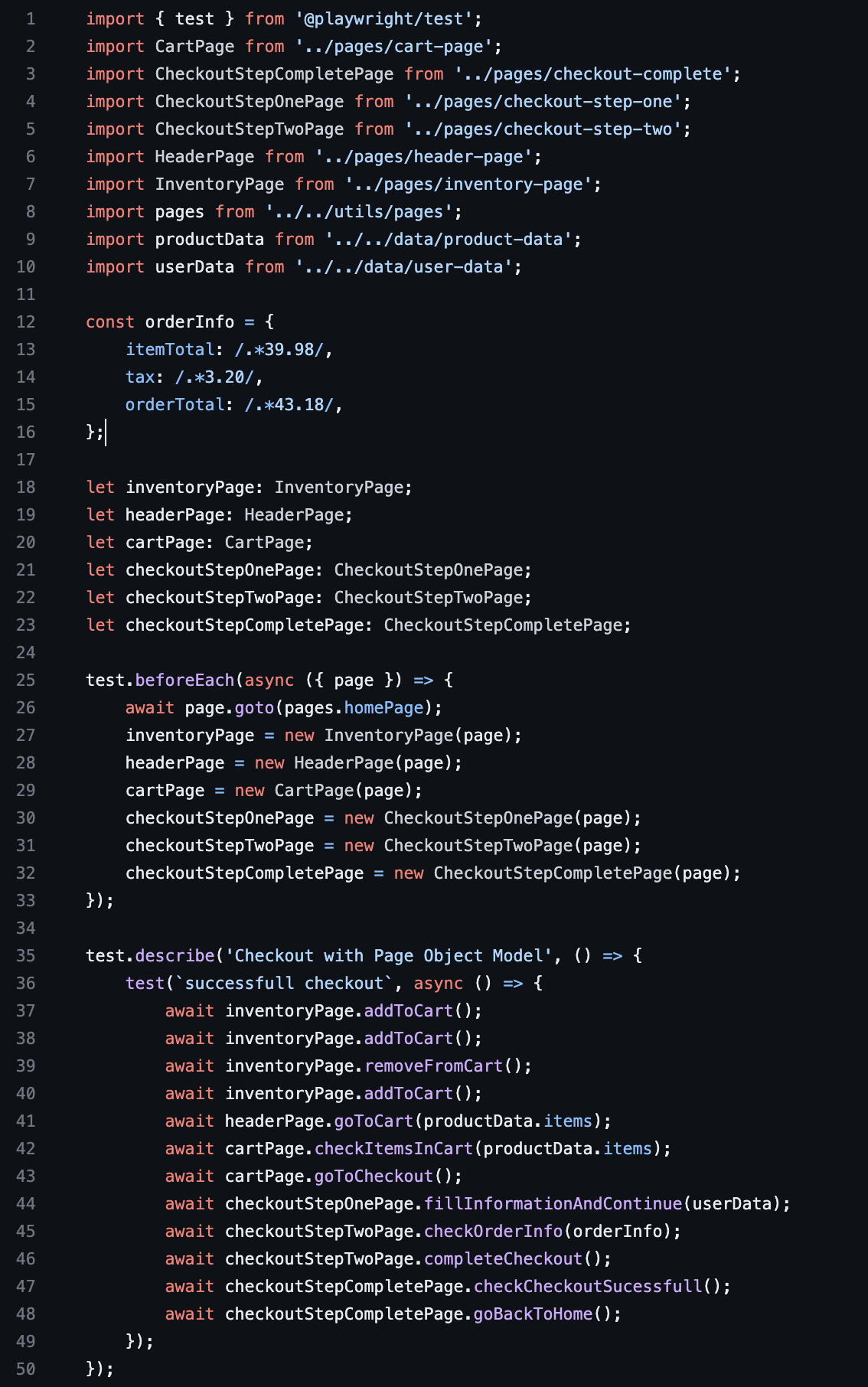
- Checkout Test Considerations:
There are several ways to analyze these two approaches. Let’s take a look:
In the scenario without POM, the file has more lines of code, and when reading the document, you need to pay a little more attention to understand what’s being done. Playwright offers “test.step,” which makes the code a little more organized, but even so, when reading the code below
await test.step('go to cart', async () => {
  await page.locator('#shopping_cart_container').filter( { hasText: '2' }).click();
  await expect(page.getByRole('button', { name: 'Remove' })).toHaveCount(2);
});
you’ll need to think a bit and sort of “guess” what’s happening. Meanwhile, the same code snippet using a POM is much more self-explanatory:
 await headerPage.goToCart(productData.items);
 await cartPage.checkItemsInCart(productData.items);
Of course, you still need to look at the POM file, understand what’s happening, and make any necessary adjustments. But imagine you’re new to the project and are told there’s a change in the “checkoutStepTwoPage” section. Instead of reading the entire `checkout.spec.ts` file to figure out where the code will be affected, you can look at the `checkout-pom.spec.ts` file and see that you only need to focus on these two methods (since they clearly mention “checkoutStepTwoPage”):
await checkoutStepTwoPage.checkOrderInfo(orderInfo);
await checkoutStepTwoPage.completeCheckout();
Furthermore, if this functionality is being used in other parts of the code, without POM, you’d also need to search through the code and hope to find all the places where it’s used (you’d still need to consider that locators might be mapped differently). Whereas with a POM, you only need to make changes in the POM, and if there’s an impact on the logic, you can easily search for the method name and assess whether an adjustment is needed.
Another consideration is from the perspective of implementing new scenarios: without the POM, you’ll need to go into the system, figure out which locator to use, or use the recording tool—copying, pasting, running the test, and so on. With a POM, however, you can simply type the line of code equivalent to the functionality you need. If you’re not yet familiar with the system, since there’s a standard in place, you’ll go to a single file (the POM) and easily identify what you need—instead of having to search the code for keywords or involve other developers to explain how it works.
Example 2:
- Website: https://demoqa.com/books
- Context: This code was implemented for the advanced Playwright course. Since specific scenarios were implemented to demonstrate certain features, some best practices were not followed. Once again, this code does not represent real-world project scenarios. In this example, the scenario is slightly different from Example 1. In all the spec files, I used POM, and in two files, I used the Page Object Model dynamically. This concept is simply the grouping of similar functions or steps linked to the creation of a Page Object, such as “page.goto” (a function to load a URL). In this case, you can insert the commands you want into the `hooks.ts` file, and instead of creating each Page Object in the spec file, it is created within the `
hooks` itself when it is called. If you have certain functions that won’t always be executed, you can include conditional statements (ifs) in the code; be careful not to make the code too complex.
The POMs were created in the same way as in the previous examples.
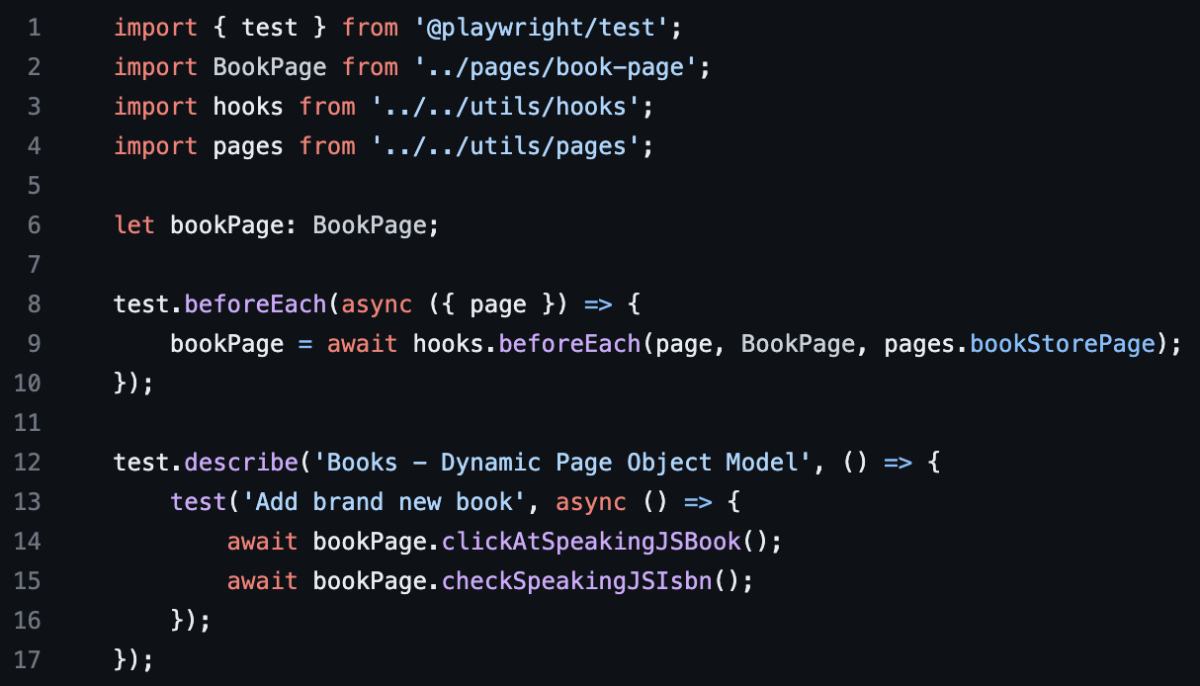
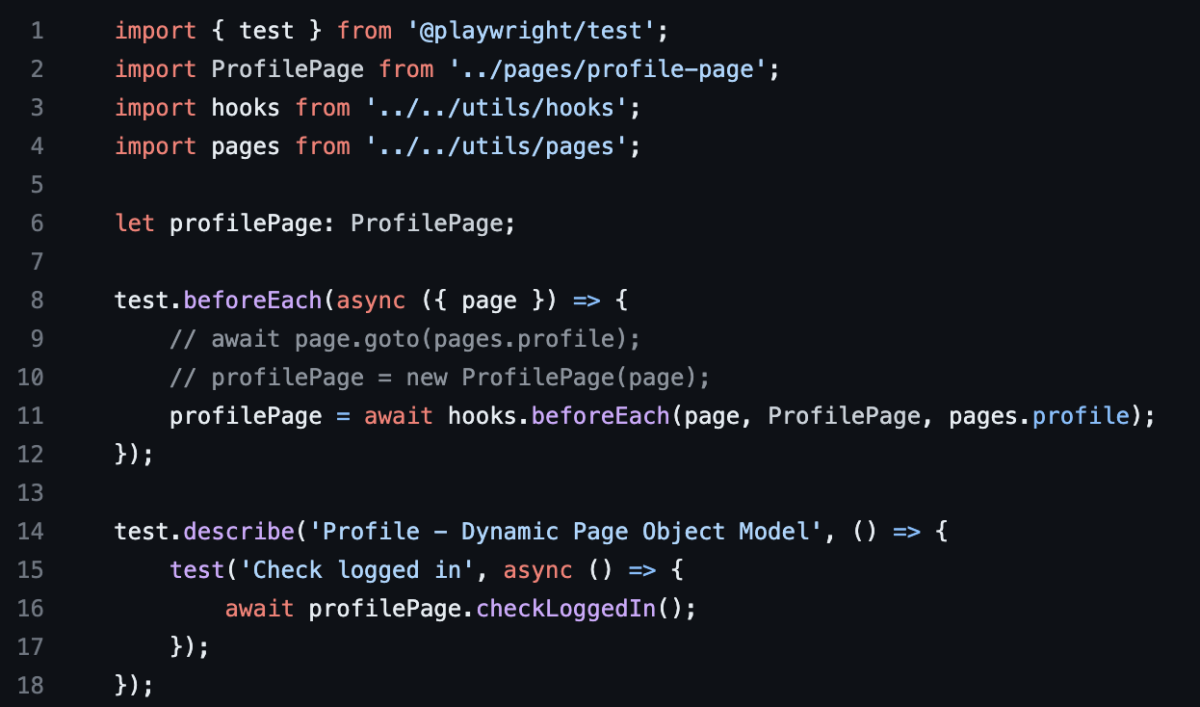
- Notes: In the second file, the commented-out lines 9 and 10 show what the code would look like in the standard Page Objects format. In this case, line 11 will create the Profile page object and proceed with the test. Since the tests were not intended to cover multiple scenarios, it’s difficult to compare the with- and without-POM versions in this example, but we can see that, once again, the instructions are simple and clear in both scenarios.
When to Use the Page Object Model (or POM) with Playwright
It’s important to agree with your team on which pattern to use—whether to use the Page Object Model for all pages/blocks/components or not to use it at all. It’s not recommended to use it for some scenarios and not for others. In my experience with Playwright, I haven’t yet encountered a situation where POMs weren’t worth the effort. So, after evaluating your project and determining that it really makes sense, establish some guidelines for creating them. Here are a few points I usually consider.
- Groups of elements on the page that are related to the same theme: header, menus, footer, blocks of elements that repeat across multiple pages (for example, a shopping cart icon on an e-commerce site), search, filters, sorting: It’s important to decouple elements to keep the code clean, but also consider whether you’re breaking things down into too small a granularity, which could result in an excessive number of files.
- The number of workflows that will use the elements and the methods related to them: If there are many workflows that use the elements, it’s a good idea to have a dedicated POM file to avoid code duplication. Also consider, if there are many methods, whether it’s possible to split the file even further to prevent it from becoming too large. Or move grouped methods to another layer; in this case, it’s important to evaluate VERY CAREFULLY to avoid introducing code complexity.
- Number of people working on the project: Consider the number of changes a file will undergo during a sprint or phase of your project; you should also assess potential code conflicts and ease of integration with the version control repository.
Community Contributions
While chatting with the folks in the Playwright Brasil WhatsApp group, a few ideas came up on how to use POM:
- map the locators to a JSON, YAML, or other type of file, without the methods: It’s important to consider the points I mentioned in “When to Use the Page Object Model (or POM) with Playwright.” If the team is very large and this file requires a lot of maintenance, it may start to generate a lot of code conflicts. If the file gets too large, it might not be a good idea either. Defining a standard for how this file will be organized is also important: will it be sorted alphabetically or in some other way? This makes maintenance easier
- Mapping locators in the “actions” files: an interesting approach. This concept of “actions” comes from Java; if you’re using JavaScript/TypeScript, this concept might not be as familiar. I always think it’s important to use concepts from the technology we’re developing, so even though “actions” are very similar to the concept of a “pom file,” if you’re working with JavaScript/TypeScript, it might be worth considering a different approach.
- Using PageBase: an approach that arose from some limitations of Selenium. Once again, I recommend thoroughly understanding the framework you’re using and the advantages/innovations it offers, rather than simply following patterns we’re accustomed to. It’s not wrong to use PageBase, but it’s important to use techniques thoughtfully.
- Using singleton + POM: also a recommended design pattern for object-oriented languages. For JavaScript/TypeScript, however, it’s an anti-pattern.
- Using `
export const` + `variavel: locator`: another interesting approach. Much simpler than the “original Playwright POM.” It’s important to evaluate the performance difference and potential issues between using “export const” versus “function” in JavaScript/TypeScript. Once you understand this, use whichever is most relevant for your project. - Using a layer “below” the Page Object, which can be called a “Component Object”: for applications that have components reused across multiple pages, this approach is very interesting. In my view, it still fits within the “modern concept” of the Page Object, but in fact, the mapping is not by “page” but rather by “context” or “component.”
Thank you to everyone who contributed: Felipe, Fábio dos Anjos, Wallace Petrucci, Marcos, Jess, Josias Valentim, Reinaldo Rossetti! You guys are awesome!!
Conclusion
Depending on the framework and the size of the project, the Page Object Model can be very interesting (remember to abstract the concepts and apply more modern and efficient solutions according to the language and framework you’re using). I’d like to emphasize that each case should be evaluated individually, and guidelines for its use should be agreed upon and standardized among the team.
It’s often not possible to evaluate all scenarios at the start of a project. Also, remember to stay open to potential refactorings that may be necessary and to reevaluate your decisions from time to time to keep your code healthy.
Additional References
- Singleton: https://blog.bitsrc.io/the-singleton-pattern-in-typescript-b906303fda93
- export const vs function: https://stackoverflow.com/questions/39582318/export-const-arrow-function-or-basic-function
- export const vs function: https://dev.to/skinnypetethegiraffe/function-or-const-which-do-you-prefer-typescriptjavascript-apa
- Locator Strategies with Playwright: https://testingwithrenata.com/portfolio/applitools-webinar-locator-strategies-playwright/
- Playwright Courses: https://testingwithrenata.com/trainings/
- Video on the YouTube channel: @TestingWithRenata
