This page was machine-translated from Portuguese and may contain mistakes. Read the original
Alura held an Artificial Intelligence immersion program from June 19 to 23, 2023, and I participated (until the 21st, lol).
Check out the highlights from each class.
Class 1 – Getting to Know the Tools:
- ChatGPT uses a neural network model called LLM (Large Language Model) that first gained attention around 2018.
- “Prompt” is the term used to describe the environment in which artificial intelligence is used. And the system can maintain a contextual conversation without you having to constantly perform specific searches.
- The results presented are compilations of information provided to the system, unlike an official data source on a specific topic. That’s why these results differ depending on whether you search in Portuguese or English—and even when you use the same language but ask the same question in different ways.
- There are several AI platforms; in addition to ChatGPT (which is the best known), there’s also Poe, which has access to various bots (even if ChatGPT is down, you can still use it through Poe).
- On Bing, which is Microsoft’s search engine (similar to Google), you can also use ChatGPT.
- Google also has Bard, which is currently available only to a select few.
- Each of these platforms has slightly different features; for example, Bard already displays some additional results for your query, while ChatGPT offers a button to “regenerate” the response, if you’d like. Bing also generates images.
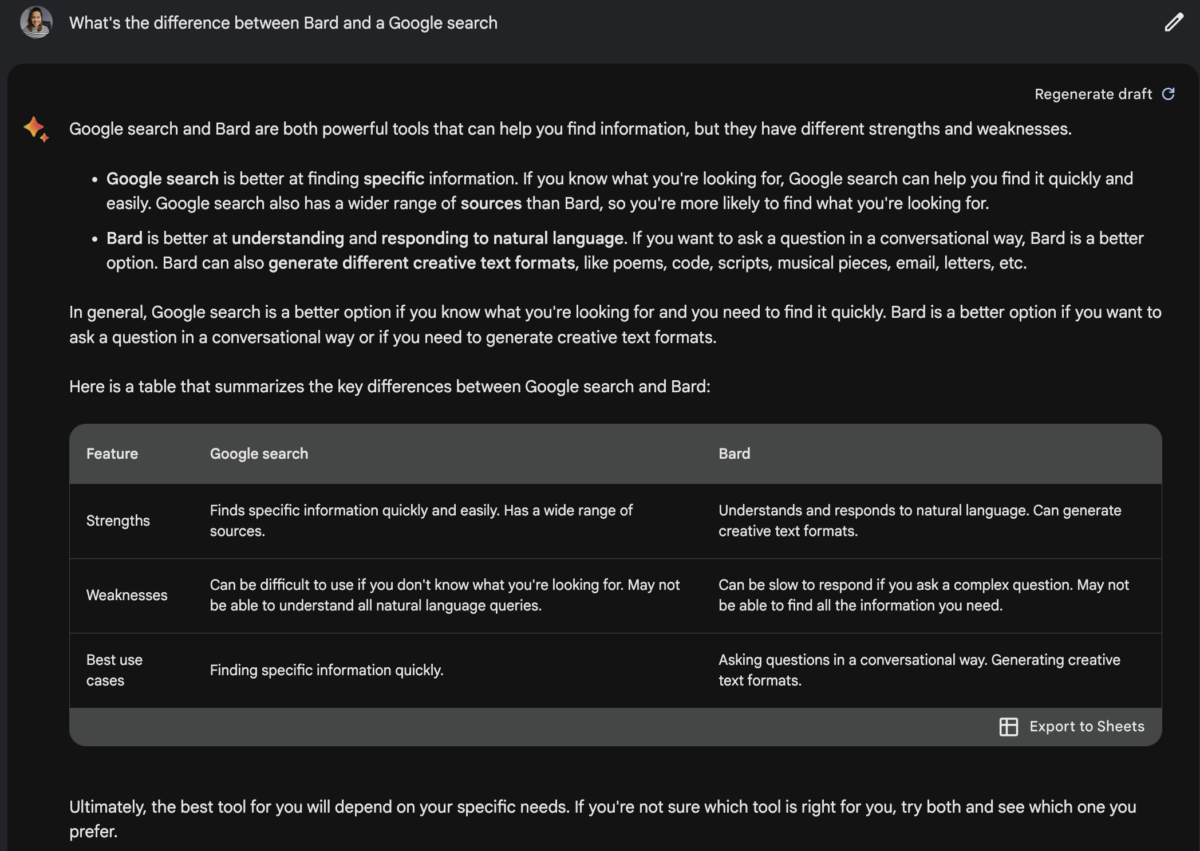
Here’s an example of when I asked what the difference is between Bard and a Google search:
Lesson 2 – Prompt Engineering and What’s New:
- Using hyphens or titles yields different results. For example:
Summarize the following three movie reviews, stating their sentiment (positive, negative, neutral)
—blah blah blah
—ble ble ble
—bli bli bli
Summarize the following three movie reviews, stating their sentiment (positive, negative, neutral)
—- Review 1 —
blah blah
blah— Review 2 —
ble ble ble—
Review 3 —
bli bli bli - Refine your question to get more effective results. There are actual techniques (studied by professionals and known as prompt engineering) to make the results more effective. For example
:- List a diet for a vegan;
– List a diet, in table format, with 5 meals for a vegan who works out in the morning and avoids foods such as onions, eggplant, and beans. - Avoid very large datasets with a wide variety of data and asking for an evaluation. It’s better to simplify the contexts and then “manually” group the responses.
- You can integrate tools with ChatGPT—for example, in Google Sheets via APIs. You can use the formula `
=GPT("pergunta"&<célula>)`, and it will generate the response directly in the file. It’s not 100% efficient; in some cases, it can’t generate a response and returns an error. (There are also=GPTLISTand=GPTIMAGEin Google Sheets, and Microsoft is working to offer these integrations in Excel as well.)
- It’s important to clearly understand what you want to do in order to decide which tool is best to use. AI won’t always be the best tool. But you can combine tools to get results faster.
- There’s GitHub Copilot, which is an AI designed to help you code.
- Framer AI generates websites in seconds. I LOVED THIS ONE!
Lesson 3 – Prompt Engineering Techniques:
- ChatGPT was trained on data up through 2021. And it uses (in a veeeery simplified way) probabilities to provide answers (here’s a more technical explanation: Hipsters.tech). Once again, we’ve seen that it provides meaningful results, but they aren’t precise data—they may not be accurate, they can have a margin of error, and depending on what you ask for, that margin can be larger or smaller. And artificial intelligence also doesn’t have the ability to “guess,” which is why it needs precise instructions.
- ChatGPT version 4 is available on the paid plan and delivers much more refined results than the free version 3.5; the difference between the two versions is approximately 6 months.
- One technique for obtaining more accurate answers is to include a few examples with your question, known as “Few Shots.” For example: “Please generate a text to post on LinkedIn about an AI Immersion program similar to this ‘blah blah blah.’”
- Another technique called “Chain of Thought” can also be used. It basically involves providing a step-by-step reasoning structure so that ChatGPT can arrive at the correct answer more quickly. If you present a math problem, ask for results little by little or even use the phrase “Let’s think step by step…” Alternatively, you can add the phrase “Are you sure?” or “Think about your answer” at the end of the response.
- The Engage AI tool generates posts for LinkedIn.
- Scientific articles explaining techniques to improve the prompt experience and ChatGPT’s own documentation on best practices:
Other lessons
I wasn’t able to attend the last two lessons, which covered:
- Lesson 04: Spreadsheet Tasks with AI and APIs
- Lesson 05 Workflow: No-Code Automation
However, they did host some live streams that are still available and worth checking out:
- AI Immersion: Next Steps in Your Career and Artificial Intelligence
- AI Immersion: 7 Artificial Intelligence Tools Beyond ChatGPT
- AI Immersion: Top Projects and Your Journey into Artificial Intelligence
Conclusion
There’s a lot of progress in the field of Artificial Intelligence, and in my opinion, it’s still very unclear exactly how this will impact software development itself. I do believe it will significantly accelerate development—we already know that—but I’m curious to see how quality will be affected, what new types of problems quality engineers will have to deal with, and the ethical implications of it all. For now, my suggestion is this: keep up with the developments and adapt gradually so that the impact is spread out over time. Always remember that our field is a dynamic one, and that we need to take advantage of the benefits it offers us. Happy studying!
